
Business routers, switches, gateways & PoE installed and serviced.
Bulletproof WiFi installs, replaces, services, upgrades, and troubleshoots the core equipment that keeps business networks running. We work with most major networking brands, including equipment you already own, and provide turnkey on-site service from diagnosis through replacement and final configuration.
What the core pieces of a business network actually do.
Routers, gateways, switches, and PoE switches each have a different job. Understanding those roles makes it easier to build a network that is reliable, expandable, and easier to troubleshoot later.
The device that directs traffic between networks.
A router connects your internal business network to other networks, most commonly the internet. It decides where traffic needs to go and typically provides services such as DHCP, NAT, and traffic routing between network segments.
The business network’s connection point to the outside world.
“Gateway” is often used for a device that combines routing with additional network-management functions. Depending on the platform, a gateway may handle internet connectivity, DHCP, VLAN routing, multi-WAN connections, VPN services, and centralized management.
The device that connects wired equipment together.
A network switch provides Ethernet ports for computers, printers, access points, phones, cameras, servers, and other devices. It allows those devices to communicate efficiently across the local network and connects them back to the router or gateway.
A switch with control, visibility, and configuration.
An unmanaged switch is generally plug-and-play. A managed switch gives us control over features such as VLANs, port settings, traffic behavior, link aggregation, monitoring, and PoE management. Managed switching becomes increasingly important as a business network grows.
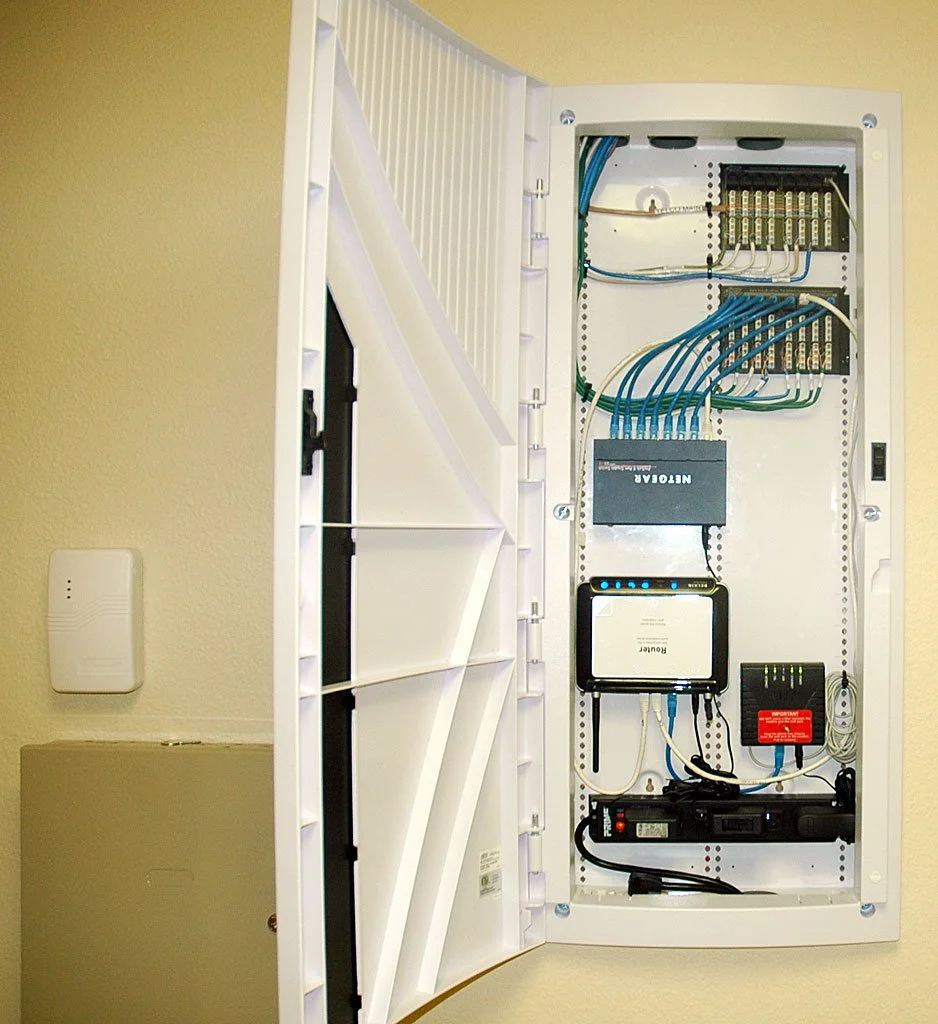
What is PoE, and when do businesses need it?
PoE stands for Power over Ethernet. A PoE switch can send both network data and electrical power through the same Ethernet cable. That eliminates the need for a separate power outlet next to many network devices.
PoE is especially useful for devices that are mounted on ceilings, walls, or other locations where running separate electrical power would be inconvenient.
- Wireless access points
- VoIP desk phones
- IP security cameras
- Intercoms and access-control devices
- Other PoE-compatible network hardware
We also verify that a switch has the correct PoE standard and power budget for the devices it needs to support. Having PoE ports is not enough if the switch cannot provide the total wattage the equipment requires.
Dual-WAN business internet: two providers, one more resilient network.
If internet downtime hurts your business, we can configure a network to use two internet connections. A properly designed dual-WAN setup can use a primary provider for normal traffic and automatically move connectivity to a secondary provider when the primary connection goes down.
Keep working when the primary ISP fails.
We regularly configure businesses with a primary internet service and a secondary connection for backup. Depending on the gateway and available services, the backup may be fiber, cable, fixed wireless, cellular, or another provider.
Use the right gateway for multiple internet connections.
Not every router or gateway supports dual-WAN the same way. We evaluate the existing equipment and business requirements on site, then configure or replace the gateway as necessary to provide reliable failover.
VLANs help organize and separate business network traffic.
A VLAN — or Virtual Local Area Network — lets us create logically separate networks while using the same physical switching infrastructure. That can be useful when different people or devices should not all share the same network segment.
- Separate employee traffic from guest Wi‑Fi
- Keep cameras, phones, printers, or specialized equipment in their own network segments
- Separate teams, departments, tenants, or operational groups when appropriate
- Design larger IP address pools for offices that need more device capacity than a typical small-office subnet provides
VLAN design is not just about creating more network names. We plan the VLAN structure together with the appropriate IP subnets, DHCP scopes, switching, and routing so the network remains understandable and scalable.

When equipment fails, we handle the problem from diagnosis through replacement.
You should not have to identify a model number, research compatibility, or guess which component is causing the outage before calling us.
We diagnose the network on site.
We inspect the router or gateway, switches, cabling, internet connection, connected devices, and network behavior to determine what is actually failing. We do our consulting on site because the right hardware recommendation depends on the real environment.
We stabilize the network whenever practical.
Our trucks carry a variety of networking equipment. When the exact permanent replacement is not available that day, we can often create a temporary or workable solution that gets the business operating again while the correct hardware is ordered.
We order the correct replacement equipment.
Once we know the actual requirements, we can source the router, gateway, switch, PoE switch, or related hardware that fits the job instead of asking the customer to research and purchase equipment independently.
We return, install, configure, and test it.
Some repairs naturally require a second visit. We install the replacement, reconnect the network, restore the required configuration, verify connected equipment, and test the system before we leave.
New installation, replacement, upgrade, or troubleshooting.
We work on existing commercial networks as well as new installations. The goal is not to force every business into the same brand or architecture — it is to make the equipment you rely on stable, understandable, and appropriate for the way your business actually operates.
New routers, gateways, switches & PoE equipment
Installation, rack mounting, patching, connection to existing cabling, configuration, and verification for new or expanded business networks.
Failed or outdated network hardware
We can identify failing equipment, source an appropriate replacement, migrate the required configuration, and minimize disruption during the changeover.
More ports, faster uplinks, more PoE, or more capacity
Businesses grow. We can upgrade switching, gateways, PoE capacity, rack equipment, and supporting infrastructure when the existing network no longer fits the workload.
Intermittent, slow, unstable, or confusing networks
We troubleshoot the complete path rather than assuming the problem is one device. That may include internet service, routers, gateways, switches, PoE, cabling, access points, printers, and other connected equipment.
This service is part of our broader business Wi‑Fi and office networking work. For the physical infrastructure behind the equipment, see our business Ethernet and structured cabling and patch panel and network rack installation services.
We service most major networking brands.
Bulletproof WiFi is not a single-brand installer. We regularly work on networks built from many different manufacturers, including mixed-brand environments and equipment the customer already owns.
UniFi is one platform we encounter regularly, but it is only one of many. The best solution depends on the business, the existing infrastructure, the workload, and what is already installed.

Need a router, switch, gateway, or PoE problem solved?
We provide on-site commercial network service, troubleshooting, replacement, upgrades, and turnkey equipment installation. If something has failed, we can diagnose it, stabilize the network when practical, source the right replacement, and complete the installation for you.